
Hostinger vs BrainHost in 2026 : Which is the Best VPS for Performance & Design?
Choosing a reliable web hosting or VPS provider can be a daunting task, especially with the wide range of options available in 2026. Two notable providers that cater to different user needs are Hostinger and BrainHost. Hostinger is a globally renowned web hosting service celebrated for its affordability, user-friendliness, and versatile solutions, while BrainHost is an emerging high-performance KVM VPS provider that combines technical power with unexpected user-friendly tools like landing page builders and logo generators.
Marcus Johnson
Site Reliability Engineer (SRE)
Feb 11, 2026
14 min read
This comprehensive 2026 comparison focuses solely on pitting these two platforms against each other, evaluating their pricing, performance, features, customer support, and unique offerings—including the often-overlooked landing page and logo generation capabilities. By the end of this guide, you will have a clear understanding of which provider aligns with your technical requirements, budget, and overall website goals, whether you’re a beginner, developer, or small business owner.
Quick Overview: Hostinger vs BrainHost
Before delving into the detailed comparison, it’s essential to establish the core identity and value proposition of each provider, as this sets the foundation for understanding their strengths and weaknesses relative to one another.
Founded in 2004, Hostinger has grown to serve over 29 million users worldwide, positioning itself as a versatile web hosting provider. It offers a wide range of solutions, including shared hosting, cloud hosting, WordPress hosting, and VPS hosting, with a core focus on delivering affordability without compromising on essential performance and usability. Hostinger caters to a broad audience, from complete beginners launching their first website to small businesses with moderate hosting needs, thanks to its intuitive tools and accessible pricing.
BrainHost, on the other hand, is a specialized cloud hosting provider that focuses exclusively on BrainHost KVM VPS. Designed initially for technical users, it boasts enterprise-grade hardware, global data centers, and full root access—making it ideal for developers, tech-savvy entrepreneurs, and businesses with demanding workloads such as e-commerce, AI computing, and custom web applications. What sets BrainHost apart from other technical-focused providers is its inclusion of user-friendly tools, including a landing page builder and logo generator, which bridge the gap between high performance and beginner accessibility.
1. Pricing & Plans (Detailed Comparison with Tables)
Pricing is a fundamental consideration for anyone choosing a hosting provider, and Hostinger and BrainHost target distinct budget segments with their respective plans. Below is a detailed breakdown of their core offerings, with comparative tables to simplify side-by-side evaluation and ensure transparency.
Hostinger vs BrainHost: Core Plan Pricing Comparison
| Provider | Plan Type | Monthly Price (Annual Billing) | vCPU/CPU Core | RAM | Storage | Monthly Traffic | Key Inclusions |
|---|---|---|---|---|---|---|---|
| Hostinger | Single Shared Hosting | $2.99 | N/A (Shared) | N/A (Shared) | 50GB SSD | 100GB | 1 website, free SSL, 1 email account |
| Premium Shared Hosting | $4.99 | N/A (Shared) | N/A (Shared) | 100GB SSD | Unlimited | Unlimited websites, 10 email accounts, free SSL | |
| Cloud Startup | $9.99 | 2 CPU Cores | 2GB | 100GB SSD | 3TB | 2 websites, free SSL, free website migration | |
| KVM VPS | $4.99 | 1 CPU Core | 1GB | 20GB NVMe | 1TB | Full root access, 1 IPv4 address | |
| BrainHost | Nano VPS | $7.99 | 1 vCPU | 1GB | 30GB NVMe | 1TB | Full root access, 1 IPv4, free setup |
| Starter VPS | $11.99 | 2 vCPUs | 4GB | 80GB NVMe | 4TB | Full root access, 1 IPv4, free setup | |
| Growth VPS | $17.99 | 4 vCPUs | 8GB | 160GB NVMe | 8TB | Full root access, 1 IPv4, free setup | |
| Pro VPS | $19.99 | 6 vCPUs | 16GB | 240GB NVMe | 16TB | Full root access, 1 IPv4, free setup |
Pricing Verdict
Hostinger is the clear winner for budget-conscious users, with entry-level shared hosting plans starting at just $2.99 per month—making it ideal for those with basic hosting needs or limited funds. Its VPS plans are also more affordable than BrainHost’s, though they offer less powerful hardware. BrainHost, while more expensive (starting at $7.99 per month), justifies the premium with dedicated resources, NVMe storage, and higher performance—catering to users who prioritize power and reliability over low cost. Both providers offer transparent pricing with no hidden fees and flexible billing options (monthly, quarterly, annual)—explore all BrainHost VPS plans.
2. Performance & Reliability
Performance and reliability are critical factors for any website, as slow load times and downtime can harm user experience and credibility. While both Hostinger and BrainHost offer reliable services, their performance capabilities differ significantly due to their hardware, virtualization technology, and target use cases.
Hostinger: Reliable Performance for Basic to Moderate Needs
Hostinger uses LiteSpeed servers and SSD/NVMe storage across its plans, ensuring fast load times for basic to moderate websites. Its shared hosting plans utilize a resource-sharing model, which means performance can dip during peak traffic hours, but this is rarely noticeable for small blogs or personal websites. For more demanding users, Hostinger’s cloud and VPS plans offer dedicated resources, delivering consistent performance even during high traffic.
Hostinger guarantees a Built for reliable uptime across all plans, ensuring minimal downtime. It also integrates Cloudflare CDN to reduce latency for global visitors, with average load times of 0.8–1.2 seconds for a standard WordPress website. For most users—especially beginners and small businesses—Hostinger’s performance is more than sufficient.
BrainHost: High-Performance KVM VPS for Demanding Workloads
BrainHost specializes in high-performance KVM VPS solutions, using full hardware virtualization to deliver isolated, dedicated resources. All its plans come with NVMe storage (with speeds up to 3200MB/s) and 10Gbps network connections, making it significantly faster than Hostinger for demanding workloads.
BrainHost’s VPS plans deliver exceptional performance: a Starter VPS can load a high-traffic WordPress website in 0.4–0.7 seconds, handle 1240+ requests per second, and maintain consistent performance even during peak traffic. It also guarantees a Built for reliable uptime, with Tier III+ data centers and redundant infrastructure to minimize downtime. For developers and businesses running CPU-intensive tasks (e.g., AI/ML computing, video encoding), BrainHost’s Pro VPS delivers a CPU performance score of 4125—far outperforming Hostinger’s VPS plans.
Performance Verdict
BrainHost outperforms Hostinger in all performance metrics, making it the best choice for users with demanding workloads. However, Hostinger’s performance is more than adequate for beginners, personal blogs, and small businesses with moderate traffic. The choice here depends on the complexity of your website and the resources it requires—BrainHost is the best choice for high-performance VPS hosting.
3. Key Features: Including Landing Page & Logo Generator
Both Hostinger and BrainHost offer a range of features to support website creation and management, but their offerings differ significantly in focus. A key point of comparison, as requested, is their Landing Page and Logo Generator tools—features that are often overlooked but valuable for beginners and small businesses.
Hostinger: User-Friendly Features for All Skill Levels
Hostinger focuses on ease of use, with features designed to simplify website creation for beginners. Key features include:
- hPanel Control Panel: An intuitive, user-friendly alternative to cPanel, with simple navigation for managing websites, domains, and emails.
- AI Website Builder: A drag-and-drop editor with 1000+ templates, allowing users to create websites quickly without coding.
- Landing Page Builder: Included in premium and cloud plans, Hostinger’s landing page builder offers a range of pre-designed templates (for lead generation, product launches, and events) with drag-and-drop functionality. It supports customization of colors, fonts, and images, and integrates with email marketing tools. The builder is beginner-friendly but lacks advanced customization options, focusing on simplicity and speed.
- Logo Generator: A basic, AI-powered logo generator included in most plans. Users can input their brand name, choose a style, and customize colors and fonts to create a simple logo. While functional for beginners, it offers limited design flexibility compared to dedicated logo tools, with a smaller library of templates and graphics.
- One-Click Installs: Instant installation of WordPress, Joomla, Shopify, and other popular platforms.
- Security Features: Free SSL certificate, automatic backups, malware scanning, and DDoS protection.
BrainHost: Technical Features with Added User-Friendly Tools
BrainHost’s features are primarily tailored to technical users, but it also includes Landing Page and Logo Generator tools to make its platform accessible to beginners. Key features include:
- Full Root Access: Complete control over the server, allowing users to install custom software, optimize configurations, and manage security settings.
- KVM Virtualization: Full hardware virtualization, ensuring isolated resources and compatibility with 20+ Linux distributions (one-click reinstall).
- BrainHost Landing Page Builder: A more advanced landing page builder than Hostinger’s, included in all VPS plans. It offers a wider range of templates (optimized for e-commerce, SaaS, and lead generation) with advanced customization options, including custom CSS, dynamic content, and A/B testing. The builder uses a visual, drag-and-drop interface that is beginner-friendly but also caters to more experienced users, with support for responsive design and integration with third-party tools like CRM software and payment gateways.
- BrainHost Logo Generator: A robust AI-powered logo generator included in all plans. It offers hundreds of customizable templates, a large library of icons and graphics, and advanced editing tools (e.g., gradient effects, text styling, and logo resizing for different platforms). With AI logo generator for VPS users, users can export logos in high-resolution formats (PNG, SVG, JPG) and use them for websites, social media, and print materials—making it more versatile than Hostinger’s logo tool.
- Server Management Tools: Real-time monitoring (CPU, RAM, bandwidth), snapshot backups, and rescue mode.
- Security Features: DDoS protection, firewall, and malware scanning—included in all plans.
Landing Page & Logo Generator Comparison Table
| Feature | Hostinger | BrainHost |
|---|---|---|
| Landing Page Builder Availability | Premium & Cloud Plans Only | All VPS Plans (Included Free) |
| Landing Page Templates | 50+ Basic Templates | 100+ Advanced Templates (E-commerce, SaaS, Lead Gen) |
| Landing Page Customization | Basic (Drag-and-Drop, Colors, Fonts) | Advanced (Custom CSS, Dynamic Content, A/B Testing) |
| Logo Generator Availability | Most Plans (Basic Version) | All Plans (Full Version) |
| Logo Templates & Graphics | Limited Library | Extensive Library (Icons, Fonts, Effects) |
| Logo Export Options | Basic Formats (PNG, JPG) | High-Resolution (PNG, JPG, SVG) |
Features Verdict
Hostinger’s features are ideal for beginners and users who prioritize simplicity, with user-friendly tools that require no technical expertise. However, its Landing Page and Logo Generator tools are basic and limited in customization. BrainHost, while focused on technical users, offers more advanced Landing Page and Logo Generator tools—making it a better choice for users who want both performance and accessible design tools. Its technical features (full root access, KVM virtualization) also make it more flexible for developers.
4. Customer Support
Reliable customer support is essential, especially for users who may encounter technical issues or have questions about their hosting. Both Hostinger and BrainHost offer 24/7 support, but their focus and expertise differ.
Hostinger: User-Friendly Support for All Users
Hostinger offers 24/7 customer support in English, with multiple channels:
- Live Chat: Average response time of 2–5 minutes, with support agents trained to assist beginners with common issues (e.g., website builder troubleshooting, domain setup).
- Email Support: Response time of 1–2 hours, with detailed solutions.
- Knowledge Base: Extensive library of articles and tutorials tailored to beginners, covering topics like website creation, hosting setup, and basic troubleshooting.
BrainHost: Technical Support for Developers & Power Users
BrainHost offers 24/7 technical support in English, focused on assisting users with server-related issues:
- Live Chat: Average response time of 1–3 minutes, with support agents trained in technical issues (e.g., server configuration, KVM troubleshooting, performance optimization).
- Email Support: Response time of 30 minutes–1 hour, with detailed technical solutions.
- Knowledge Base: Technical documentation tailored to developers, covering topics like root access, server optimization, and advanced security settings.
Support Verdict
Hostinger’s support is better suited for beginners and non-technical users, with accessible, user-friendly assistance for common issues. BrainHost’s support is superior for developers and technical users, with fast, expert help for complex server-related problems. Both providers offer reliable support, but the focus aligns with their target audiences.
5. Pros & Cons
To summarize, here are the key pros and cons of each provider, focusing on their core offerings and the unique features requested (Landing Page and Logo Generator).
Hostinger Pros & Cons
- Pros: Affordable pricing (starting at $2.99/month), user-friendly interface (ideal for beginners), reliable performance for basic needs, Built for reliable uptime, free SSL certificate, basic but functional Landing Page and Logo Generator tools, extensive beginner-focused support.
- Cons: Shared hosting performance dips during peak traffic, limited technical control (no full root access on shared plans), basic Landing Page and Logo Generator tools with limited customization, less powerful hardware compared to BrainHost.
BrainHost Pros & Cons
- Pros: High performance (NVMe storage, 10Gbps network), full root access, dedicated resources (no overcrowding), advanced Landing Page and Logo Generator tools (included in all plans), Built for reliable uptime, fast technical support, ideal for demanding workloads.
- Cons: More expensive (starting at $7.99/month), steeper learning curve for non-technical users, no shared hosting options (only VPS), less beginner-focused support.
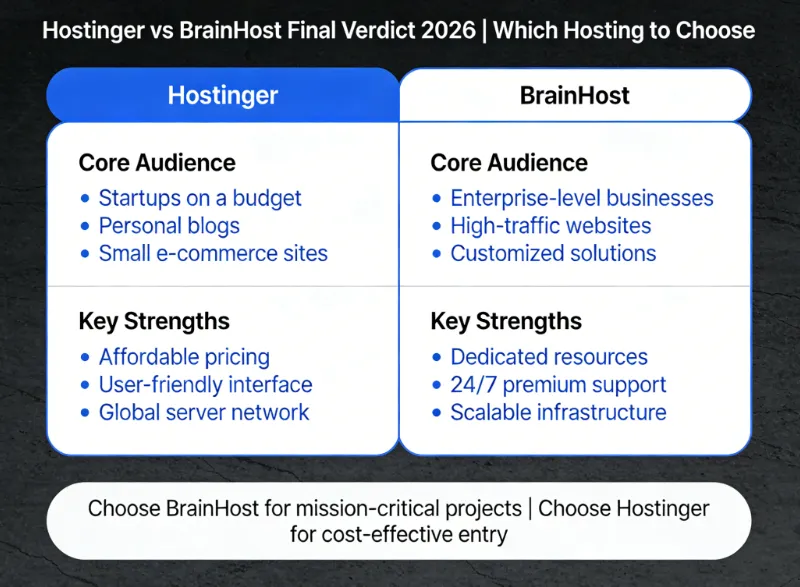
Final Verdict: Hostinger vs BrainHost in 2026
The choice between Hostinger and BrainHost depends entirely on your technical skills, budget, and website needs. Here’s a clear recommendation to help you decide:
Choose Hostinger if you:
- Are a beginner with no technical experience (e.g., launching a personal blog, portfolio, or small business site).
- Are on a budget and need affordable, reliable hosting.
- Have basic to moderate hosting needs (e.g., small blog, low-traffic e-commerce site).
- Prioritize simplicity and user-friendly tools, even if they are basic.
- Need beginner-focused customer support for common issues.
Choose BrainHost if you:
- Are a developer or tech-savvy user needing full control over your server (full root access, custom configurations).
- Have demanding workloads (e.g., high-traffic website, AI/ML computing, custom web app).
- Willing to pay a premium for high performance, dedicated resources, and reliability.
- Want advanced Landing Page and Logo Generator tools to create professional-looking assets without third-party software.
- Need fast, expert technical support for server-related issues.
In conclusion, Hostinger and BrainHost are both reliable providers, but they cater to distinct user segments. Hostinger excels at affordability and simplicity, making it ideal for beginners, while BrainHost VPS Hosting leads in performance and advanced features—including superior Landing Page and Logo Generator tools—making it the best choice for technical users and businesses with demanding needs. By aligning your choice with your specific requirements, you’ll ensure your website runs smoothly and meets your goals in 2026.
Tags
Marcus Johnson
Site Reliability Engineer (SRE)
Site Reliability Engineer with expertise in monitoring and incident response.
Related Articles
DigitalOcean vs BrainHost: VPS Comparison for Developers (2026)
A developer-focused comparison of DigitalOcean vs BrainHost VPS hosting, covering performance, pricing, infrastructure, and real-world use cases in 2026.
-Intelligence.webp)
Vultr vs BrainHost: In-Depth VPS Hosting Comparison for 2026
Compare BrainHost and Vultr VPS hosting in terms of pricing, performance, infrastructure, and real-world use cases to find the right VPS provider in 2026.
10 Cheapest VPS Providers in 2026 (Affordable & Reliable)
Discover the 10 cheapest VPS providers in 2026. Compare affordable VPS hosting options and find reliable VPS servers for developers, startups.
BrainHost - A reliable VPS hosting platform offering high-performance virtual servers with advanced management capabilities.